Keyboard Diagnostic Suite: Testing Rollover, Chattering, and Performance
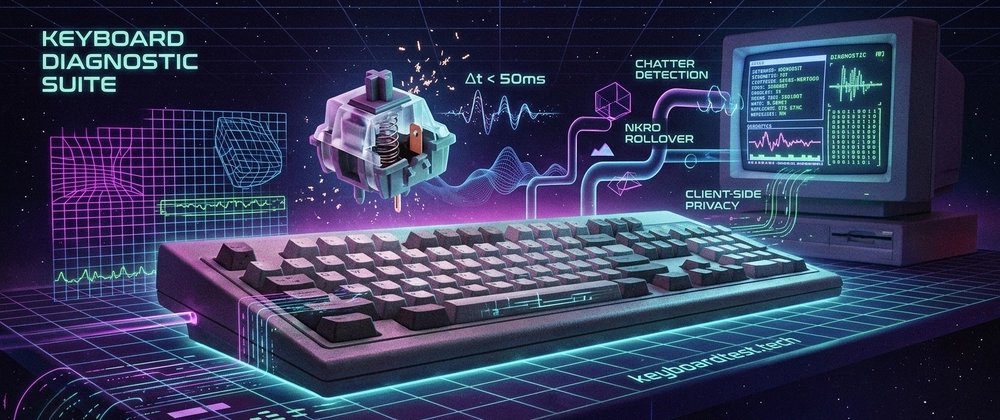
Keyboard input failure is often a silent bottleneck in developer workflows. When a rapid multi-key shortcut like Cmd+Shift+Option+K drops an input, or a single keystroke registers twice, it is rarely a user error—it is a physical hardware or firmware limitation. To help developers, gamers, and hardware enthusiasts diagnose these bottlenecks without relying on unverified legacy executables, I built the Keyboard Diagnostic Suite.
his browser-based tool evaluates key rollover matrix limits, contact bounce (chattering), and input pipeline latency using native web APIs. Here is a look under the hood at the hardware physics and the diagnostic logic powering the platform.
1. Switch Chattering and Contact Bounce Analysis
Every mechanical keyboard switch operates via physical collision. When a key is pressed, metal leaf contacts strike each other and bounce microscopically before stabilizing, a process that typically takes 1ms to 5ms. Without a firmware-level "debounce" algorithm to filter out these electrical echoes, the computer would register a single tap as dozens of rapid-fire inputs.
As switches age, accumulate dust, or suffer from oxidized contacts, this bounce duration extends beyond the firmware's programmed debounce window, resulting in "key chatter" or double-typing. The diagnostic suite measures the exact millisecond intervals (\(\Delta t\)) between consecutive keydown timestamps on identical keys to categorize hardware health:
- < 20 ms: Critical hardware failure or severely degraded debounce circuitry
- 20–50 ms: Moderate chattering often pointing to switch contamination
- 50–80 ms: Mild chatter indicating early mechanical wear
- 80–200 ms: Healthy baseline representing standard rapid human input
2. Matrix Ghosting and N-Key Rollover (NKRO)
Most keyboards use a grid matrix of rows and columns to detect inputs. When three or more keys sharing a row and column intersection are pressed simultaneously on a board lacking per-key isolation diodes, the controller cannot distinguish the exact inputs. This results in "ghosting" (registering a phantom key) or blocking (dropping the actual input entirely).
While high-end mechanical boards boast full N-Key Rollover (NKRO), many standard USB-C keyboards default to a 6-Key Rollover (6KRO) limit due to basic USB HID profile restrictions. The suite visualizes this physical matrix limit by tracking concurrent inputs in real-time, instantly revealing if a keyboard can handle complex development chords or if it drops keystrokes under load.
3. Scan Rate vs. Polling Rate Tracking
A common misconception is that a keyboard's responsiveness is entirely dictated by its USB polling rate. In reality, total latency relies on a two-part pipeline:
Scan Rate: How frequently the keyboard's internal microcontroller checks the physical switch matrix for state changes
Polling Rate: How frequently the controller reports that data to the host PC via USB, ranging from 125Hz (8ms intervals) up to high-performance 8000Hz (0.125ms intervals)
The diagnostic suite computes browser event processing deltas by comparing the native Event.timeStamp against the execution queue. This helps isolate micro-stutters caused by KVM switch buffering, Bluetooth sleep states, or heavy CPU interrupt loads, rather than just measuring raw USB transmission speeds.
100% Client-Side Privacy
Because effective keyboard testing requires pressing every key—including alphanumeric characters and modifiers—privacy is the foundation of the architecture. The entire suite operates locally on the client machine using native W3C KeyboardEvent and Web Performance APIs. Zero keystrokes, interval metrics, or telemetry data are ever transmitted to an external server.
You can audit your own daily driver directly in your browser at keyboardtest.tech. If you have experience tuning QMK/VIA debounce algorithms or tracking browser micro-latency, I would love to hear your feedback in the comments.
About the author
- Full-stack web developer passionate about building fast, privacy-first web applications with Next.js, React, TypeScript, and Tailwind CSS. I enjoy creating practical developer tools, exploring modern web technologies, and sharing what I learn through technical articles. Currently building KeyboardTester (https://keyboardtest.tech), a free browser-based keyboard testing tool for developers, gamers, and hardware enthusiasts.
Comments
Join the discussionNo comments yet. Be the first to comment.